


If Ethereum transaction fees feel expensive, you’re not alone. Many users now move their ETH to Arbitrum, a faster and cheaper network that still uses Ethereum’s security.
The process is called bridging — and it does NOT mean selling or converting your ETH.
You still own ETH. You’re simply moving it to a cheaper network to use apps with lower fees.
Bridging Ethereum to Arbitrum allows you to use your ETH with dramatically lower fees while keeping the security of the Ethereum network. Instead of paying high gas costs on mainnet, you can move your assets to Arbitrum and interact with DeFi, trading platforms, and dApps for a fraction of the cost.
This guide explains exactly how the bridge works, why it exists, and how to safely transfer your funds. The guide will walk you through every step from zero experience.
What You Need Before Starting
Before we begin, make sure you have:
• A computer (desktop or laptop recommended)
• Internet connection
• Some ETH on an exchange (like Binance or Coinbase)
• About $5–$20 extra ETH for gas fees
You will NOT need technical knowledge. But first, the basics.
What Is Arbitrum?
Arbitrum is a Layer-2 scaling network built on top of Ethereum. It processes transactions off the main chain and then settles them back to Ethereum, making transactions significantly cheaper and faster.
It uses Optimistic Rollups, meaning Ethereum still secures your funds while Arbitrum handles execution.
Ethereum vs Arbitrum
| Feature | Ethereum | Arbitrum |
|---|---|---|
| Average transaction fee | $5 – $60 | $0.05 – $0.80 |
| Speed | Slow | Fast |
| Security | Native | Inherits Ethereum |
| DeFi access | Full | Same apps, cheaper |
You are not converting ETH into another coin — your ETH remains ETH.
What Is the Arbitrum Bridge?
The Arbitrum Bridge is a smart-contract system that moves assets between Ethereum Mainnet and Arbitrum.
How it works
- ETH is locked on Ethereum
- A proof is sent to Arbitrum
- ETH is minted on Arbitrum
- When withdrawing, ETH is burned on Arbitrum and unlocked on Ethereum
This keeps supply balanced and secure.
What You Need Before Bridging
Before starting, make sure you have:
• MetaMask or another Web3 wallet
• Some ETH for gas fees (important)
• Stable internet connection
• Correct official bridge website
⚠️ Never use links from Telegram, Discord DMs, or emails.
Step-by-Step: Bridge Ethereum to Arbitrum
Step 1 — Install MetaMask (If You Don’t Have It)
To bridge Ethereum to Arbitrum, you need a Web3 wallet. In this case, we will go with MetaMask.

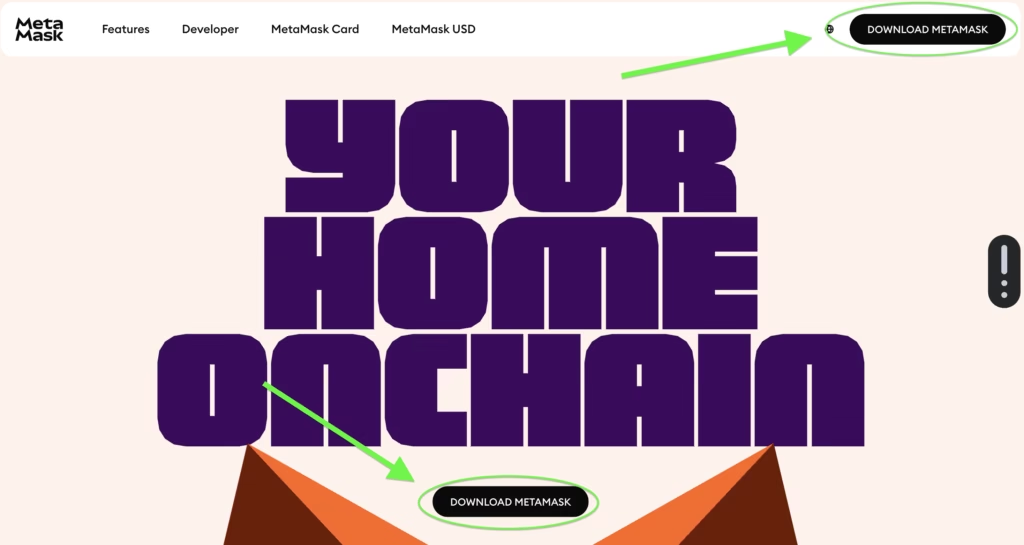
- Go to the official MetaMask website
- Click Download (See screenshot below)
- Install the browser extension (Chrome, Brave, Edge or Firefox)
- Open the extension after installing
- Click Create a wallet
- Set a password
- Write down the 12-word recovery phrase on paper (very important)
Confirm the phrase
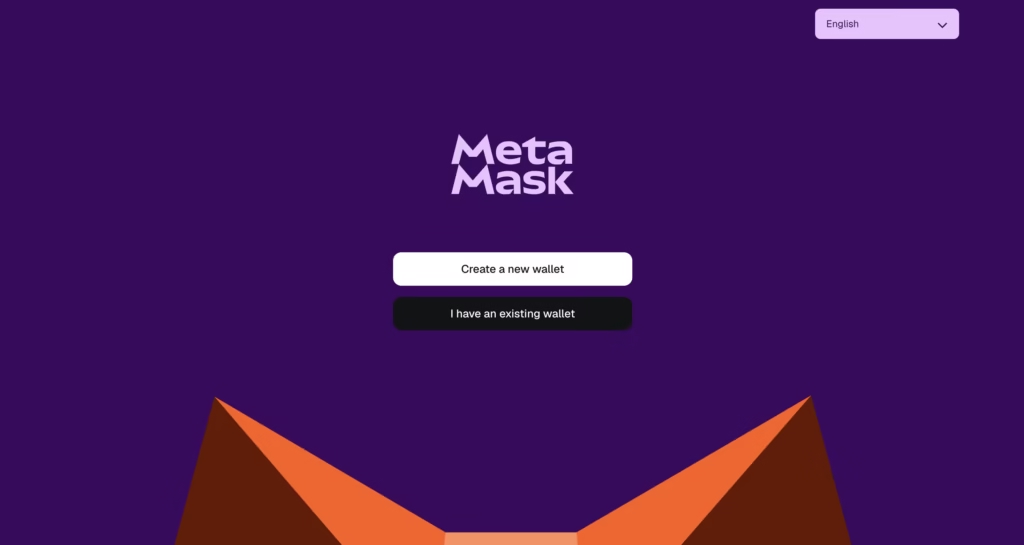
⚠️ Never share your recovery phrase with anyone. Anyone who has it can steal your funds.
After installation, you will see a small fox icon in your browser toolbar.
Whenever this guide says “open MetaMask”, click that icon.
Step 2 — Send ETH to Your Wallet
Now you need ETH inside MetaMask.
- Open MetaMask
- Copy your wallet address (starts with 0x)
- Go to your exchange account
- Withdraw ETH to that address
- Wait for confirmation (usually 1–5 minutes)
Your balance will appear in MetaMask.
Step 3 — Add the Arbitrum Network
Instead of typing technical settings manually, MetaMask can add Arbitrum automatically.
- Open the official Arbitrum Bridge
- Click Connect Wallet
- Select MetaMask
- MetaMask will ask: Allow this site to add network?
- Click Approve
- Click Switch Network
Arbitrum is now added.
Step 4 — Choose the Amount to Bridge
You will now see two networks:
From: Ethereum
To: Arbitrum
- Enter the amount of ETH to move
- Leave a small amount behind for gas fees
(Example: if you have 0.05 ETH, send 0.045)
Click Move funds to Arbitrum
Step 5 — Confirm the Transaction
MetaMask opens a confirmation window.
This is the Ethereum gas fee — it is normal for this step to cost a few dollars.
- Click Confirm
- Wait
Do NOT close the page.
Step 6 — Wait for Completion
The transfer takes about 5–15 minutes.
After it finishes:
- Open MetaMask
- Change network to Arbitrum One
Your ETH will appear there.
Congratulations — your ETH is now on Arbitrum.
What Just Happened?
Your ETH was not converted.
Instead:
• ETH was locked on Ethereum using smart contracts
• The same amount appeared on Arbitrum
• Both are backed 1:1
You still own ETH.
Related: y
Using Your ETH on Arbitrum
Now transactions are extremely cheap — usually less than $0.50.
You can now:
• Trade tokens
• Swap coins
• Use DeFi apps
• Mint NFTs
If you mainly plan to trade or move NFTs, you may also consider Polygon, which is optimised for low-cost NFT activity. You can follow our guide on bridging Ethereum NFTs to Polygon.
All while paying much lower fees than Ethereum mainnet.
Withdrawing Back to Ethereum
Moving funds back works differently.
| Direction | Time |
|---|---|
| Ethereum → Arbitrum | 5–15 minutes |
| Arbitrum → Ethereum | About 7 days |
The delay is a security feature protecting the network.
Fees Explained
You pay only:
• One Ethereum gas fee to enter
• Tiny fees on Arbitrum afterwards
The bridge itself does not charge a fee.
Common Beginner Mistakes
Funds not showing
Switch MetaMask network to Arbitrum
Sent full balance
You must keep ETH for gas
Transaction pending long
Ethereum may be congested — wait
Withdrawal taking 7 days
Normal security waiting period
Final Thoughts
Bridging to Arbitrum is one of the simplest ways to use Ethereum without paying high fees.
You keep full ownership of your ETH while gaining faster and cheaper transactions.
For anyone using crypto regularly, moving to Layer-2 networks like Arbitrum quickly becomes essential.
Frequently Asked Questions
You are likely still on Ethereum network in MetaMask. Switch to Arbitrum One.
No. It is locked on Ethereum and mirrored on Arbitrum.
Arbitrum uses a fraud-proof challenge period to protect the network.
No, once confirmed on Ethereum it cannot be reversed.
Transactions are processed off-chain and settled back to Ethereum.
Yes — the bridge uses Ethereum smart contracts, not a company.